Latest Updates
Travel to Technology

Use Visual Studio Code for Salesforce Development(IDE)
The Salesforce Development (IDE) Extension For Visual Studio Code
This extension is a companion for SFDC (Salesforce.com) development with Visual Studio Code.It is targeted at developers who want a lightweight and fast way to work with their Salesforce files.There’s no complicated setup process or project configurations, no external apps to keep open, and no jarring errors knocking you out of your flow.
Install VSCode (based on your operating system)
Install “ForceCode†extension on VS Code.

3. After installation complete then restart VSCode.
4. Go to File >> Open >> “Create New Folder†in your local drive.
5. Go to “View†>> Command Palette >> Type “>ForceCode Menuâ€

6. Enter your org User Name

7. Enter your org Password + SecurityToken

8. Then select the type of org Sandbox/Production – Now you will see the Src folder

9. Whether save change locally or server

10. You will have multiple option based on your need. For development select “Open Salesforce File†option
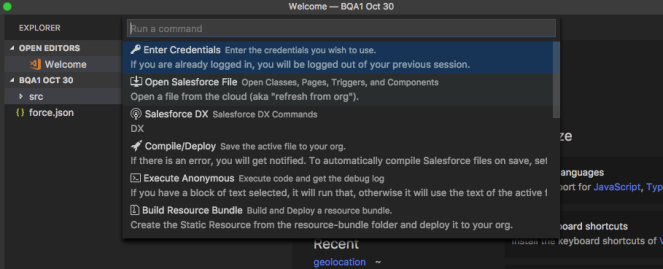
11. Then choose which file you need using text box like below. After your selected component – that will add in your local src folder.

Note: This will help you complete the development fast.IF you want to open another file the go to “View†>> Command Palette >> Select “ForceCode Menu†>> Select “Open Salesforce File†>> choose component.
Please let me know if you have any questions.
Reference Link: https://johnaaronnelson.gitbooks.io/forcecode/content/#overview
Our Recent Blogs
-
27 Jan, 2021
Salesforce Architect Domain Exam
-
23 Nov, 2016
Salesforce Certified Technical Architect New Path
-
28 Mar, 2018
Salesforce Release Exam in Trailhead Certification
-
29 Dec, 2021
Salesforce Certifications