Latest Updates
Travel to Technology

Enable List Custom Settings in Org after Spring 18
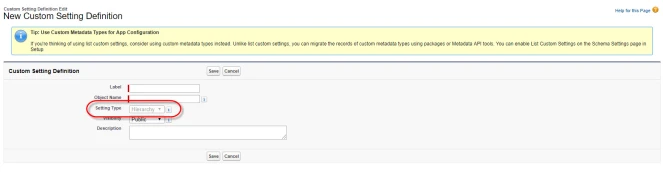
How to Make Use of List Custom Setting with Salesforce in Spiring 18
From Salesforce Spring 18 release – list custom settings option is grayed out.
The list type provides a reusable set of static data that you can access across your org so salesforce forcing you to use Custom Metadata Types. But most of the company is using list custom settings like custom object to configure static values and update the values when required for example – Having integration with external system but sandbox and production URL, Username, Password and secret key are different so we have to update the custom settings once sandbox is refreshed.
For this kind scenario we can’t use custom metadata types option since can’t be updated through apex code. You have to use metadata API.
Good news is salesforce giving option to enable List custom settings whenever you needed

Go to Setup->Data Management->Schema Settings and Enable "Manage List Custom Settings Type"Reference Document:
List Custom Settings Grayed Out
Custom Metadata Types Trailhead
Our Recent Blogs
-
27 Jan, 2021
Salesforce Architect Domain Exam
-
23 Nov, 2016
Salesforce Certified Technical Architect New Path
-
28 Mar, 2018
Salesforce Release Exam in Trailhead Certification
-
29 Dec, 2021
Salesforce Certifications